





 25% OFF
Your cart is empty
Explore our products
Onyx Sleep Wrist Alarm Instructions
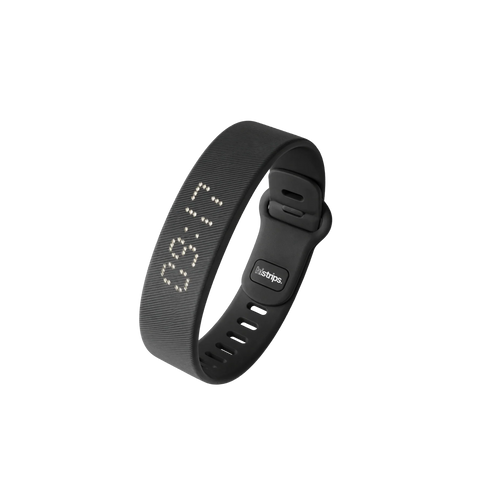
Welcome to HiStrips Onyx Alarm! On this page you will find everything you need to get your silent vibrating alarm clock up and running quickly and effectively!
Our goal? To help you start your day the way you want.
The silent vibrating alarm clock helps you wake up on time in a peaceful way and optimize your morning routine, so you can start each day fresh and full of energy. In the video below, we show you how the band works and how it can help you start your morning in the best possible way.

Video
Turn on your device by pressing the button once. You will now see the time to be adjusted. Press and hold the button for 3 seconds to start the adjustment process, first the “hour” indicator will begin to flash. Use the button to set the hour, then press the button again for 3 seconds to switch to the “minutes.” Repeat this process to set the minutes, month, day and year. You can also choose between a 12-hour or 24-hour clock format.
After completing all settings, do not press any more buttons for 8 seconds; the device will save the data and return to standby mode. Thus, your device is fully set up and ready to use!
Note: Once you set the alarm clock, it will go off at the same time every day until you turn it off or adjust it yourself. This is useful if you have a fixed alarm time; you then only have to set the alarm once.
To set additional alarms, press the button three, or four times to access the other alarm groups and follow the same procedure.
To check the battery level of your device, press and hold the button for 3 seconds while the device is in idle mode. It will then display the percentage. For more information on charging watch the video above.
We understand how important it is to wake up on time! If you're not waking up with the standard version, don't worry. Try this:
Need more power? If the standard version still isn’t waking you up, contact us by email. We’ll work with you to find a solution, which may include upgrading to the Pro version for a stronger vibration and more alarms to set.
We’re here to make sure you wake up on time, every time!
The vibration lasts for 2 minutes and then stops automatically.
There is no traditional snooze button. However, you can create a snooze effect by setting multiple alarms. You can set up to 3 alarms.
This is normal behavior. The display cycles through three types of information:
Yes, but this needs to be done manually. The alarm will not automatically turn itself back on the next day.
We offer a 90-day money-back guarantee. If Onyx doesn't work for you, simply return it for a full refund. No questions asked.


Our team usually replies within a 24 hours during business days.


![Black Nasal Strips [Year Supply]](http://histrips.com/cdn/shop/files/Black_Nasal_Strips_HiStrips-7_bdf40392-992b-4641-887c-576c2b7e3740.png?v=1787565503&width=740)


![Black Nasal Strips [6-Pack]](http://histrips.com/cdn/shop/files/Black_Nasal_Strips_HiStrips_0c631f59-753a-421b-82f3-6e4ee070c705.png?v=1787563408&width=740)


![Cotton Mouth Tape [6-Pack]](http://histrips.com/cdn/shop/files/mouth_tape_histrips_cb01f811-cc00-4315-bc9b-63ba1022b7c7.png?v=1778819341&width=740)
![Pink Nasal Strips [Year Supply]](http://histrips.com/cdn/shop/files/Pink_Nasal_Strips_HiStrips_489a568c-7fd5-4ef1-b642-823e32a0b143.png?v=1787565717&width=740)

![Cotton Mouth Tape [Year Supply]](http://histrips.com/cdn/shop/files/mouth_tape_ab5811b1-0a5e-4806-a119-48729af39f0d.png?v=1779761296&width=740)

![Lavender Mouth Tape [Year Supply] product image](http://histrips.com/cdn/shop/files/mouth_tape-1_ab63d8ef-6ca5-474b-ba1b-bc4125eadde2.png?v=1777382091&width=740)

![White Nasal Strips [6-Pack]](http://histrips.com/cdn/shop/files/white_Nasal_Strips_HiStrips_ac4fa223-ca40-4bee-b792-2641bd651103.png?v=1787564840&width=740)

![White Nasal Strips [Year Supply]](http://histrips.com/cdn/shop/files/white_Nasal_Strips_HiStrips_0d105bcd-5799-468e-8fc3-5cab9e57417a.png?v=1787565716&width=740)

![Blue Nasal Strips [Year Supply]](http://histrips.com/cdn/shop/files/blue_Nasal_Strips_HiStrips_3e1fa88b-fd51-410f-a9af-ad73dea796d7.png?v=1787565716&width=740)

![Pink Nasal Strips [6-Pack]](http://histrips.com/cdn/shop/files/Pink_Nasal_Strips_HiStrips_411390de-910c-4f12-bdd7-7edf07c9ba76.png?v=1787564049&width=740)

![Camo Nasal Strips [Year Supply]](http://histrips.com/cdn/shop/files/camo_Nasal_Strips_HiStrips_eb427e7a-67f0-427e-8728-56e2534d6c4b.png?v=1787565719&width=740)


![Lavender Mouth Tape [6-Pack]](http://histrips.com/cdn/shop/files/lavander_histrips_mouth_tape.png?v=1778819741&width=740)

![Blue Nasal Strips [6-Pack]](http://histrips.com/cdn/shop/files/blue_Nasal_Strips_HiStrips_d83a1e5b-2299-4ac0-a210-f1246842b702.png?v=1787564412&width=740)

![Camo Nasal Strips [6-Pack]](http://histrips.com/cdn/shop/files/camo_Nasal_Strips_HiStrips_09c74e36-ac5a-4418-a47d-f1ac1700187f.png?v=1787565166&width=740)


